Cloud Computing: A Breakdown for Non Technical Product Managers
Leading the charge in our digital transformation is the profound influence of cloud technology. From being a mere buzzword, the cloud has…

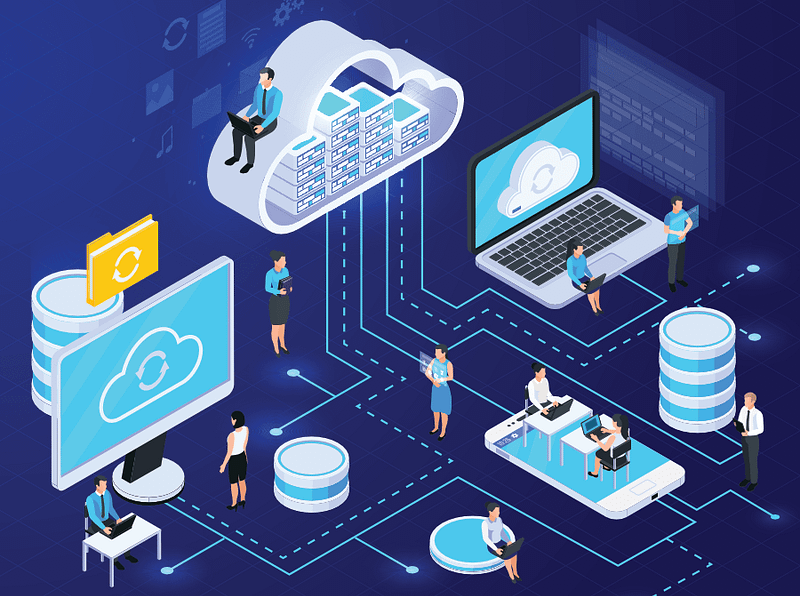
Leading the charge in our digital transformation is the profound influence of cloud technology. From being a mere buzzword, the cloud has matured into a fundamental force reshaping the realms of information technology and business strategy. This evolution is driven by a multitude of advantages, addressing and fulfilling the diverse needs of companies.
This article delves into the mechanics of cloud technology, presenting a fitting analogy for clarity. It unpacks the various components of cloud systems, explores its significance for product managers, addresses common adoption challenges and proposes effective mitigation strategies.
So what is Cloud Computing ?

Cloud computing, in the simplest terms, refers to the delivery of various services, including storage, processing, and software applications, over the internet. Instead of relying on local servers or personal devices to handle data and run applications, cloud computing utilizes a network of remote servers hosted on the internet to store, manage, and process information. These services are accessible to users on-demand, often on a subscription basis, allowing them to harness the power of advanced computing resources without the need for extensive local infrastructure.
Confused?
Let’s use a real life analogy to help you understand better….

Imagine cloud computing as a public library.
Traditionally, if you wanted to read a book, you’d go to your personal bookshelf at home (equivalent to local servers or personal devices).
However, with cloud computing, it’s like having access to an expansive library where books (data, applications) are stored on shelves (remote servers) located elsewhere.
In the traditional model, you’re responsible for buying, organising, and maintaining your book collection (local infrastructure). With the cloud, you can simply visit the library, pick the books you need, read them, and return them when you’re done. You don’t have to worry about storing or maintaining the books — they are available on-demand.
In this analogy:
Cloud Services: The library provides various services (books, computers, study rooms), just as the cloud offers services like storage, processing, and software applications.
Remote Servers: The library’s shelves represent remote servers where books (data) are stored. You don’t need to know where the shelves are; you can access the books whenever you need them.
On-Demand Access: You can borrow books when you need them and return them when you’re done, similar to how cloud services are accessible on-demand, often through a subscription, without the need for extensive local infrastructure.
So, cloud computing simplifies things. You get what you need when you need it, without the hassle of managing everything on your own. Just as you enjoy reading without worrying about maintaining a vast book collection, cloud users can harness computing power without the burden of maintaining complex server systems.
Got it? Great!
Now let’s use a Real life example of cloud computing being used
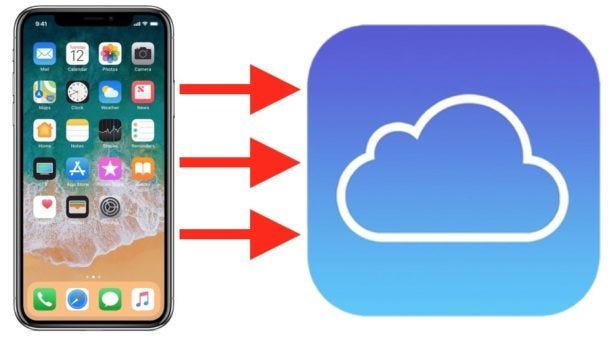
When you use iCloud on your iPhone, you’re essentially leveraging remote servers to store your data. This includes photos, videos, documents, and app data. Rather than keeping all this information solely on your iPhone, iCloud provides a cloud-based storage solution.
Before Cloud Computing..

In the era preceding the rise of cloud computing, organizations relied on on-premises IT infrastructure to fulfill their computing requirements. This necessitated the acquisition and upkeep of physical servers, storage, and networking equipment to support applications and services.
The landscape started to shift in the mid-2000s with the emergence of cloud computing as a compelling alternative to traditional on-premises setups. This shift was fueled by advancements in virtualization technology and improved internet connectivity, enabling the delivery of highly scalable, flexible, and cost-effective cloud computing services.
Cloud computing revolutionizes the way firms access IT resources. Instead of investing in and maintaining their own physical data centers and servers, organizations can leverage cloud services with a pay-as-you-go pricing model. This eliminates the need for substantial upfront investments and the associated human resources required to operate and maintain traditional infrastructure effectively.
Why is Cloud so Important?
1. Scalability and Flexibility:
Cloud services offer the ability to scale resources up or down based on demand. This means that businesses can easily adjust their computing power, storage, and other resources, ensuring optimal performance during peak times and avoiding unnecessary costs and consequences during slower periods.
Example: Take an e-commerce website experiencing a surge in traffic during a black friday sale. With cloud scalability, the website can seamlessly handle the increased demand for processing orders and serving customers without crashing or incurring excessive costs.
2. Cost Efficiency:
Cloud computing eliminates the need for businesses to invest heavily in physical infrastructure. Instead, they can use cloud services on a pay-as-you-go model, reducing capital expenses and enabling a more efficient allocation of resources.
Example: A startup launching a new app can host it on the cloud without the need to purchase and maintain servers. The startup only pays for the resources used, making it a cost-effective solution as the user base grows.
3. Accessibility and Collaboration:
Cloud services are accessible over the internet, enabling users to work from anywhere. This accessibility promotes collaboration among teams, even if they are located in different parts of the world, fostering remote work and boosting overall productivity.
Example: A project team working on a document collaboratively using cloud-based tools like Google Docs. Team members can edit and comment in real-time, regardless of their physical locations, enhancing efficiency and teamwork.
4. Leverage New Technologies:
Cloud providers continually introduce advanced technologies, allowing businesses to leverage innovations like artificial intelligence, machine learning, and big data analytics without the need for extensive infrastructure setup.
Example: An e-commerce platform using cloud-based machine learning algorithms to analyze customer behavior and provide personalized product recommendations. The platform can quickly adopt and benefit from the latest advancements in machine learning without managing the underlying infrastructure.
Why Should Product Managers learn about Cloud?
Effective Communication: Understanding cloud concepts allows product managers to communicate effectively with development teams, architects, and cloud engineers, ensuring that product requirements align with cloud capabilities.
Resource Allocation: Cloud expertise helps product managers make informed decisions about resource allocation, cost management, and performance optimization within cloud environments.
Security and Compliance: Cloud security is a top concern. Product managers with cloud expertise can navigate security and compliance requirements effectively, minimizing risks.
Innovation: Cloud platforms offer a wide array of innovative services. Product managers with cloud knowledge can leverage these services to create more advanced and competitive products
Cloud Service Models
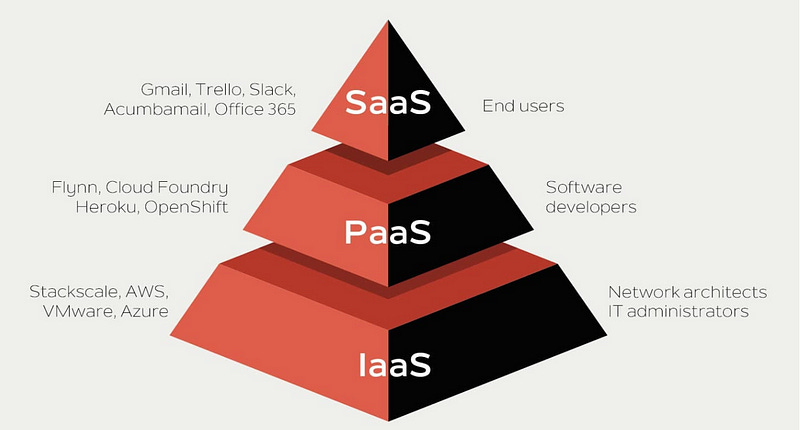
Cloud service models refer to the different categories or types of services offered by cloud computing providers. These models define how computing resources are delivered and managed over the internet. The 3 major ones include;
1. Software as a Service (SaaS):
SaaS delivers software applications over the internet, eliminating the need for users to install, maintain, and update software locally. This model is highly beneficial for product managers as it ensures seamless accessibility and updates for end-users. Examples include cloud-based project management tools, customer relationship management (CRM) software, and collaboration platforms
2. Platform as a Service (PaaS):
PaaS builds upon IaaS by providing a comprehensive platform for developers to build, deploy, and manage applications. It abstracts the complexity of infrastructure management, allowing product managers to focus on the application’s functionality. PaaS accelerates the development process, fostering innovation and quicker time-to-market for new products.
3. Infrastructure as a Service (IaaS):
IaaS is the foundational layer of cloud computing, providing virtualized computing resources over the internet. It includes virtual machines, storage, and networks, allowing businesses to avoid the need for physical hardware. Product managers benefit from IaaS by having the flexibility to scale resources up or down based on project requirements, optimising costs and efficiency.
Cloud Deployment Models
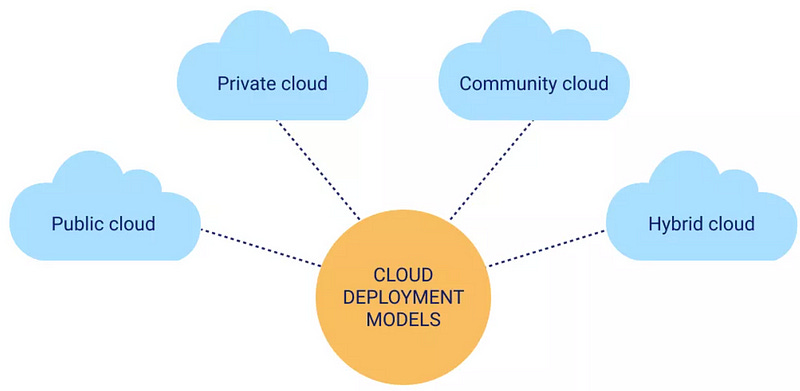
A cloud deployment model refers to an arrangement of specific environment variables like accessibility and ownership of the distributing framework and storage size.
1. Public Cloud
In a public cloud, cloud resources and services are owned and operated by a third-party cloud service provider. These resources are delivered over the internet and are shared among multiple organisations or customers. Users access and use computing resources on a pay-as-you-go model. Examples include Amazon Web Services (AWS)and Microsoft Azure.
Characteristics: Cost-effective, scalable, and : Well-suited for applications with fluctuating resource requirements.
2. Private Cloud:
In a private cloud, the cloud infrastructure is exclusively used by a single organisation. It can be located on-premises (on the organisation’s own data centres) or hosted by a third-party provider. This deployment model provides more control over the infrastructure and is often chosen for security or compliance reasons. Examples include VMware Cloud Foundation and Opensource
Characteristics: Offers greater customization, control, and privacy. Ideal for businesses with specific security or regulatory requirements.
3. Hybrid Cloud:
Hybrid cloud combines elements of both public and private clouds. It allows data and applications to be shared between them. Businesses can run certain workloads in the public cloud while keeping others in a private environment. This provides greater flexibility and optimization of existing infrastructure. Examples include.Microsoft Azure with Azure Arc and AWS Outposts,
Characteristics: Enables workload flexibility, scalability, and optimization. Useful for businesses with varying workloads.
4. Community Cloud:
Community cloud, akin to multi-cloud, revolves around shared infrastructure for organizations with common objectives. Multiple entities within a community share cloud resources tailored to their shared goals and needs, providing a collaborative and efficient cloud solution.
Characteristics: Cost effective, shared infrastructure, used by people with Common Goals & Interests and Each organization maintains Control and Customization
Choosing the Right Model

Using the appropriate cloud service and deployment models is a critical decision for product managers. The following factors are to considered:
Scalability: Does your product need to handle varying workloads? If so, prioritize scalability and consider public or hybrid clouds.
Data Sensitivity: Are you dealing with sensitive customer data or proprietary information? In such cases, private or hybrid clouds may offer better data security.
Cost Efficiency: Evaluate the cost implications of each model, including infrastructure, maintenance, and operational costs.
Development Speed: Consider the development pace your product requires. PaaS or SaaS can accelerate development, while IaaS provides more control over the development environment.
Compliance Requirements: Assess any industry-specific or regulatory compliance requirements that your product must meet
Common Adoption issues for Cloud
The adoption of cloud computing offers numerous benefits, but organizations often face challenges during the transition. Here are some common adoption issues for cloud and ways to mitigate them
1. Security Concerns:
Issue: Security is a primary concern for organizations moving to the cloud. There are apprehensions about data breaches, unauthorized access, and the overall security of sensitive information.
Mitigation: Implementing robust security measures, such as encryption, multi-factor authentication, and regular security audits. Choosing reputable cloud service providers with strong security protocols is crucial.
2. Data Privacy and Control
Issue:Concerns arise about the control and privacy of data once it’s stored in the cloud. Organisations may worry about losing control over their data and the potential for data lock-in.
Mitigation: Establishing clear data ownership and control policies in contracts with cloud providers. Implementing data encryption and carefully considering where sensitive data resides.
3. Cost Management:
Issue: While cloud computing can offer cost savings, poor management of resources can lead to unexpected expenses. Organizations may struggle to control and predict costs effectively.
Mitigation: Implementing cost management strategies, such as regular monitoring of resource usage, leveraging cost-effective services, and adopting automation to optimize resource allocation.
4. Limited Cloud Expertise:
Issue: Organisations may lack the necessary expertise to navigate the complexities of cloud adoption. This shortage of skilled personnel can hinder the effective implementation of cloud solutions.
Mitigation: Investing in training and upskilling existing IT staff, hiring experienced cloud professionals, and engaging with external consultants or managed service providers.
5. Downtime and Performance Issues:
Issue: Organizations may experience downtime or performance issues during the migration process or due to service disruptions from the cloud provider.
Mitigation: Developing a comprehensive migration plan, conducting thorough testing before full implementation, and choosing cloud providers with a reputation for reliability and uptime.
In closing, the journey into the cloud for product managers is not merely a technical exploration; it’s a strategic imperative. As the cloud becomes synonymous with agility, efficiency, and innovation, product managers embracing its potential are poised to lead their teams towards a future where products seamlessly align with the demands of a dynamic and interconnected world.