
Software Testing Essentials for PMs

Launching something new is always exciting. The effort, coordination, and problem-solving involved makes release day feel like an achievement in itself. But that feeling only lasts if the product (or feature) holds up when people begin to use it. Even with the most talented developers, things can and will slip through the cracks. Testing is what gives you the confidence that what you ship is reliable and ready for real use.
As a product manager, how you engage with testing will depend on the environment you’re working in. At a startup, you may find yourself taking on testing tasks directly. In bigger teams, Quality Assurance (QA) specialists may carry out the execution, but you’ll still play a central role in making sure testing is aligned with business priorities. In either case, your job is to understand how testing fits into delivery, what risks it uncovers, and how to make sure quality is never left to chance.
This article will walk you through the essentials. It will cover:
What Software Testing Entails
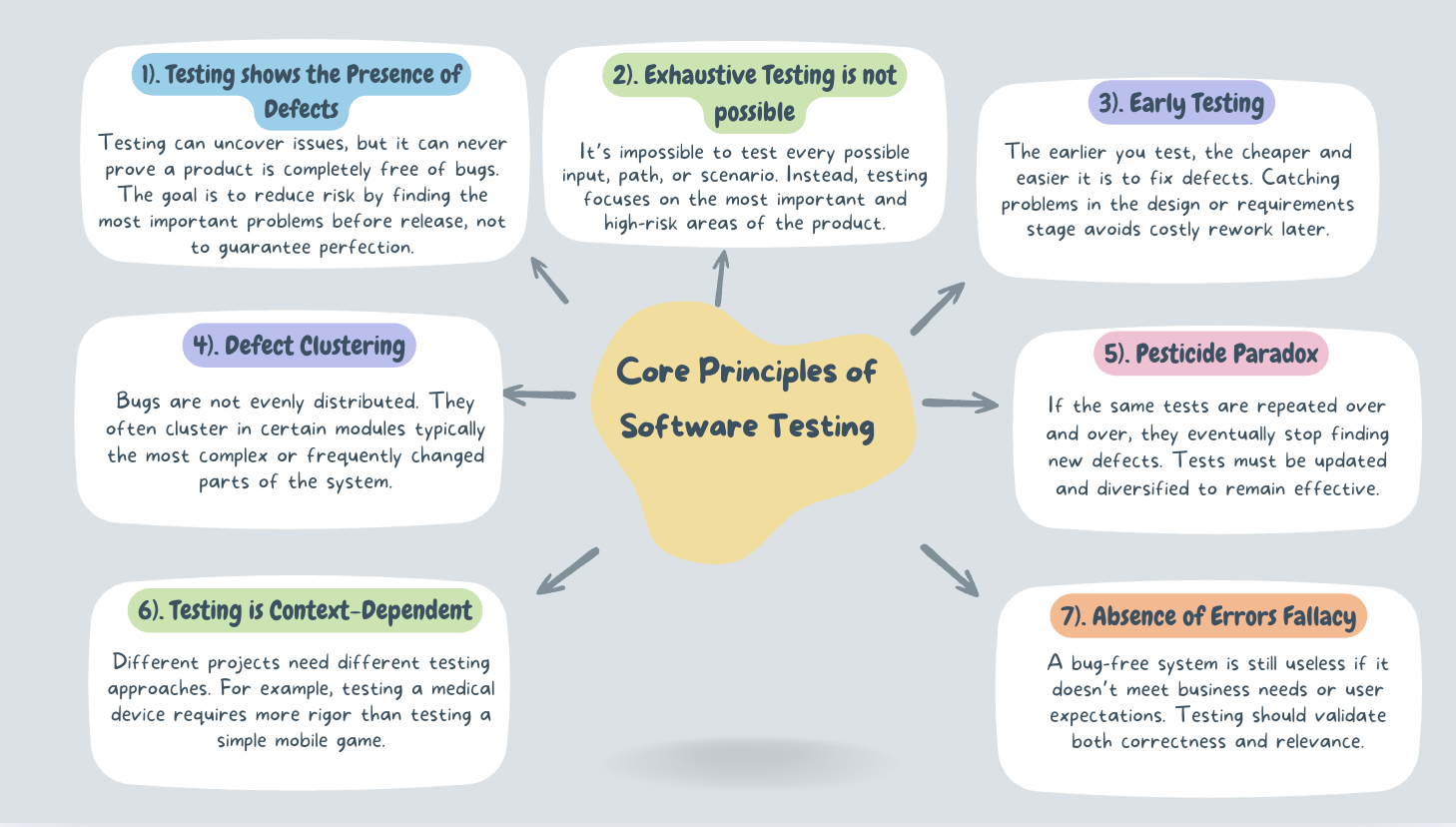
Core Principles of Software Testing
Different types of Software Testing and
How Product Managers can Ensure High-Quality Testing
To understand why testing is so critical, it helps to start with a clear definition of what software testing actually is.
What is Software Testing ?

Software testing is the structured process of evaluating a product or feature to confirm it behaves as intended in both expected and unexpected conditions. Put simply, it’s how teams verify that what was built aligns with the original plan and is ready for real users.
For product managers, testing is less about the technical execution and more about assurance i.e ensuring the product keeps the promise made to customers. To do that, testing focuses on three key outcomes: quality, ensuring features work as intended without breaking what already exists; reliability, confirming the product performs consistently and customer trust, showing users they can depend on the product to be safe and secure.
Why Testing is Essential
It’s easy to assume that once a product is built, users will interact with it exactly as intended. But in reality, people often find unexpected ways to use a product sometimes because instructions weren’t clear, sometimes because the design wasn’t intuitive, and sometimes because we simply didn’t anticipate their behaviour.
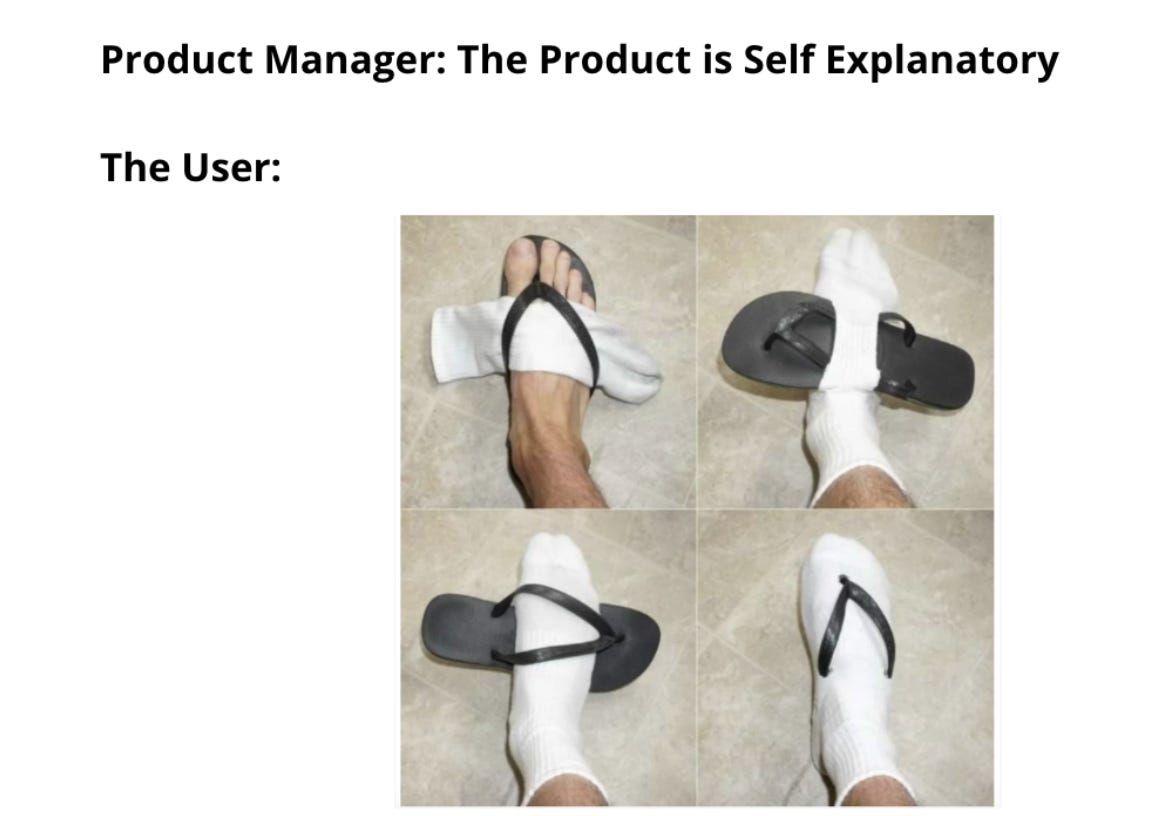
This lighthearted example shows why testing is essential. Without it, even simple features can be misunderstood or misused in ways that derail the experience.
And beyond these everyday frustrations, the consequences of poor or insufficient testing can be far more serious than a few unhappy users.
In 1985, Canada’s Therac-25 radiation machine malfunctioned because of a bug, delivering lethal doses that killed three patients.
In 1999: A software bug caused the failure of a $1.2 billion military satellite launch.
In 1996, a U.S. bank accidentally credited 823 customers with a total of $920 million due to an error in its systems.
Bloomberg’s terminal outage in 2015 disrupted 300,000 traders and forced a government bond sale to be postponed,
Starbucks had to temporarily close most of its stores in North America because of a failure in its point-of-sale software.
I’m not sharing these to scare you, but to highlight that software issues aren’t always just about user frustration or product churn. Depending on the industry you work in, the consequences of poor or insufficient testing can extend far beyond your product and affect people’s livelihood, safety, financial systems, and much more.
The lesson is clear: poor testing has consequences that go far beyond bugs. To guard against this, it’s important to follow core principles that guide how testing is approached and ensure quality is built in from the start.
The Core principles of Software Testing
Strong testing practices don’t happen by accident. They’re guided by a few principles that ensure testing supports product quality without slowing teams down
Types of Software Testing
To understand how testing actually works in practice, it helps to look at the different types. Each serves a distinct purpose, and together they ensure products are not only functional but also reliable, scalable, and user-friendly. The map below shows the key categories we’ll break down.
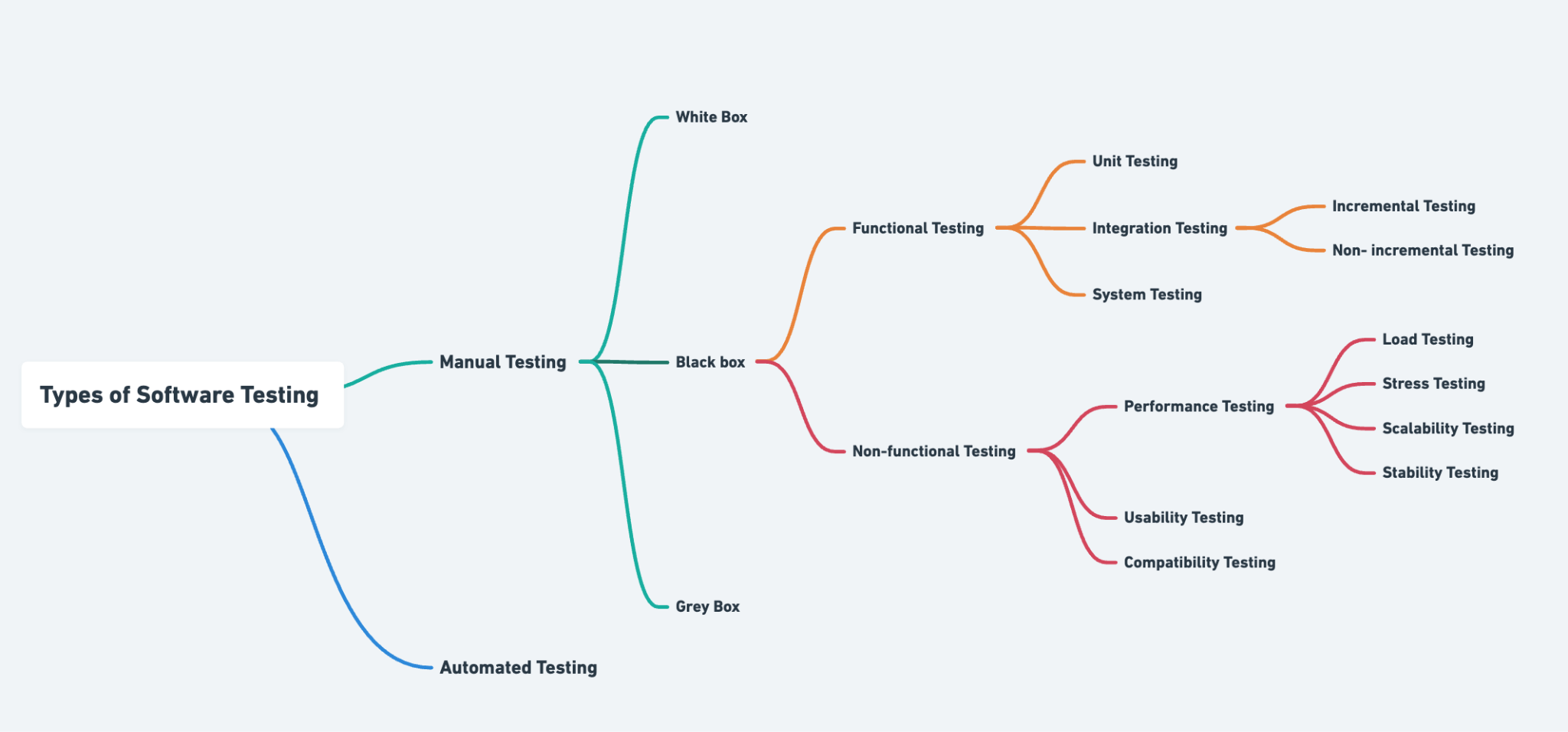
1. Manual Testing
This is testing done by humans without relying on automation tools. A tester (or even you as the PM) checks whether the product behaves as expected by following test cases, clicking through flows, or simulating real user actions. It’s slower but very useful for exploratory work, usability checks, and early stages of development.
2. Automation Testing
Here, scripts and tools are used to automatically run tests. Instead of manually checking a login page a hundred times, automation can do it in seconds. It’s efficient for repetitive tasks, regression testing (making sure old features still work), and large systems where manual testing alone wouldn’t scale. Some commonly used tools include Selenium, Cypress etc.
Manual Testing Approaches
White Box Testing: The tester has full knowledge of the system’s internal logic and code. They design tests that directly check how the system processes data step by step. Think of it as testing with the code visible. Some commonly used testing frameworks include JUnit, NUnit etc.
Black Box Testing: The tester doesn’t see the internal code. They only check inputs and outputs i.e checking if the feature does what the user expects. It’s like testing a vending machine: you don’t need to know the mechanics, just that pressing “A1” gives you the snack. A tool commonly used is Postman (API testing without code access).
Grey Box Testing: A mix of both. The tester has partial knowledge of the system’s internals and uses that understanding to design better tests.
Functional Testing (Does the product work the way it should?)
Functional testing focuses on checking whether the product’s features behave as intended. It answers the question: “Does this feature do what we built it to do?”. Types of functional Testing are;
Unit Testing: The smallest parts of the software, like individual functions or modules, are tested in isolation. Think of it as checking a single brick before building a wall. If unit tests are solid, you can trust that the foundation of the product is reliable.
Integration Testing: this testing verifies that different modules or systems work together as expected. For example, ensuring a payment gateway integrates correctly with a checkout flow. It can be conducted incrementally, where modules are tested step by step to isolate issues more easily, or non-incrementally where all modules are tested together at once. While the latter is faster, it makes debugging more difficult and is typically used only in smaller systems
System Testing: This is the full end-to-end test of the product. It checks the entire system as a whole, simulating real-world use cases to make sure everything works together. It’s the closest stage to what customers will actually experience.
Non-Functional Testing (How well does it work?)
Non-functional testing focuses on how the system performs rather than what it does. Even if features technically work, they may fail if they’re slow, unstable, or difficult to use. These tests are interconnected, with each one addressing a different dimension of product performance, usability , and compatibility.
Performance Testing forms the foundation, as it checks how the system behaves when used at different levels of demand. Within performance testing:
Load Testing: Tests how does the product perform with expected user numbers?
Stress Testing – Tests what happens when demand exceeds expectations? (e.g., sale day traffic)
Scalability Testing – Tests if the system can grow to handle more users or data?
Stability Testing – Tests if the system remains reliable over long periods of use?
Together, these subcategories provide a complete picture of how the system handles both everyday and extreme conditions. Some commonly used tools here include JMeter and Gatling.
Usability Testing: Focuses on the user experience. Can people navigate the product easily? Are labels clear? Does the workflow make sense? This type of testing often involves observing real users to see where they get confused or frustrated.
Compatibility Testing: Verifies that the product works consistently across different environments. This could include operating systems (Windows, macOS, iOS, Android), browsers (Chrome, Safari, Firefox), or devices (desktop, mobile, tablet). For example, a feature that works on Android should not fail on iOS. Some commonly used tools include BrowserStack and Sauce Labs.
The decision on which tests to run depends on several factors: the criticality of the feature, the risks if it fails, how often it will be used, the environments it needs to support, and the potential impact on the business. As a PM, your role is to guide the team to focus testing effort on the areas that carry the highest user and business value, while ensuring delivery stays efficient and reliable.
Equally important is clarifying who is involved in testing, because quality is never the responsibility of a single role. Developers typically handle unit and integration testing, QA engineers design and execute a wide range of functional and non-functional tests, PMs ensure requirements are clear and testable, designers contribute to usability checks, and stakeholders or users may participate in user acceptance testing. While the exact responsibilities vary with team size and structure, the principle remains the same: testing must be intentional, collaborative, and aligned with product goals.
How Product Managers Can Ensure High-Quality Testing
1. Write clear, unambiguous requirements
Testing starts long before code is written. If requirements are vague or incomplete, QA won’t know what to validate, and engineers may interpret them differently. This often leads to misaligned expectations and defects that could have been avoided. As a PM, you can prevent this by:
Writing requirements that are specific, structured, and free from assumptions.
Using simple, consistent language that avoids room for multiple interpretations and.
Highlighting edge cases or “what if” scenarios that matter to the business.
Clear requirements act as the foundation for testing by ensuring everyone such as developers, QA, and stakeholders has the same understanding of what success looks like.
2. Include acceptance criteria in user stories
Acceptance criteria transforms user stories from ideas into testable units. They define exactly what conditions must be met for a feature to be considered complete, creating a shared standard of “done.” For example, in a signup flow, acceptance criteria might specify that the system must reject invalid emails, send a confirmation link, and allow the user to log in only after verifying the link.
Strong acceptance criteria help:
QA create focused, relevant test cases.
Engineers build with a clear target in mind.
PMs evaluate features objectively during reviews.
By embedding acceptance criteria into every story, you reduce ambiguity, accelerate testing, and ensure quality is baked into delivery from the start.
3. Involve QA early in the process
Too often, QA is brought in only after development is nearly complete. This creates bottlenecks, leads to rework, and increases the risk of missed scenarios. Involving QA early during backlog grooming, sprint planning, or design review gives them the opportunity to:
Spot risks and gaps before development begins.
Suggest additional test scenarios you may not have considered.
Shape acceptance criteria so they are practical and testable.
Early QA involvement reduces downstream defects, speeds up delivery, and helps ensure testing is proactive rather than reactive.
4. Drive effective defect triage
Defects are inevitable, but how they’re managed determines whether a release stays on track or spirals into chaos. Defect triage is the process of reviewing, prioritising, and deciding which bugs to fix and when. As a PM, your role is to bring business context into that conversation. A cosmetic issue on a settings page is not the same as a bug that prevents users from completing payments.
What you can do:
Prioritise bugs based on user impact, revenue risk, and compliance needs not just technical severity.
Ensure stakeholders understand trade-offs, such as delaying a release versus shipping with known minor issues.
Keep the defect backlog organised so critical issues don’t get buried.
Strong defect triage practices save engineering time, protect user experience, and align the team on what matters most.
5. Encourage cross-functional ownership of quality
Quality is often misunderstood as QA’s job alone. In reality, everyone (PMs, engineers, designers, and other stakeholders) plays a part in ensuring the product works as intended. When teams embrace shared ownership, quality becomes a collective standard.
Ways to promote this mindset:
Emphasise that developers are responsible for writing clean, testable code.
Encourage designers to validate usability through early prototypes and user testing.
Lead by example by asking quality-related questions in standups, demos, and planning sessions.
When quality is seen as a shared goal, issues are caught earlier, responsibility is distributed fairly, and the team works more collaboratively toward smoother releases.
6. Create continuous improvement loops
Testing should never feel static. Each release offers lessons about what went well and what could be better. Continuous improvement loops ensure that QA insights like recurring bug types, weak spots in coverage, or patterns in user-reported issues feed back into the product process.
As a PM, you can:
Track defect trends across releases to identify systemic issues.
Use post-release reviews to capture lessons for future sprints.
Collaborate with QA to refine acceptance criteria or test cases based on feedback.
This turns testing into a learning system rather than a repetitive checkbox, raising the bar for quality over time.
7. Promote Exploratory testing
While structured test cases are essential, they can’t cover every way users interact with a product. Exploratory testing is a less formal approach where testers, developers, or PMs actively explore the product without a fixed script experimenting, pushing boundaries, and uncovering unexpected behaviours or usability gaps. By encouraging these sessions, teams gain a real user’s perspective and often surface issues that scripted tests would miss..
How you can support this:
Allocate time during sprints for exploratory sessions.
Encourage diverse team members (QA, engineers, designers, even PMs) to participate.
Treat findings seriously, even if they weren’t in the formal test plan.
Exploratory testing often reveals usability issues or edge cases that scripted testing misses, making it an invaluable complement to structured QA.

At the end of the day, testing is what stands between a product that feels polished and one that leaves users frustrated. As PMs, we don’t need to be QA experts, but we do need to be quality champions making sure testing is prioritised, risks are managed, and the team shares ownership of outcomes. When we do this well, every release reinforces trust with our users and strengthens the product over time.
Your explanation of testing as assurance rather than just execution is particularly effective. Positioning quality, reliability, and trust as outcomes helps non technical readers understand why testing deserves attention throughout delivery, not just at the end. The real world examples you included also reinforce that testing failures are not abstract risks. They have very real consequences depending on context and industry.
What this piece also highlights is the importance of visibility and alignment. When product managers understand risks uncovered by testing and can connect them back to user impact and business priorities, better decisions follow. That is much easier when testing insights are structured, traceable, and shared across teams. Many organizations rely on clear processes and tools like QA management software (https://tuskr.app/) to support that collaboration without pulling PMs into day to day execution.
I'm always eager to read your article, well done and thank you.